

Plano Estiasis KDS App
Descritpion
Dimensions
Plano Estiasis KDS App
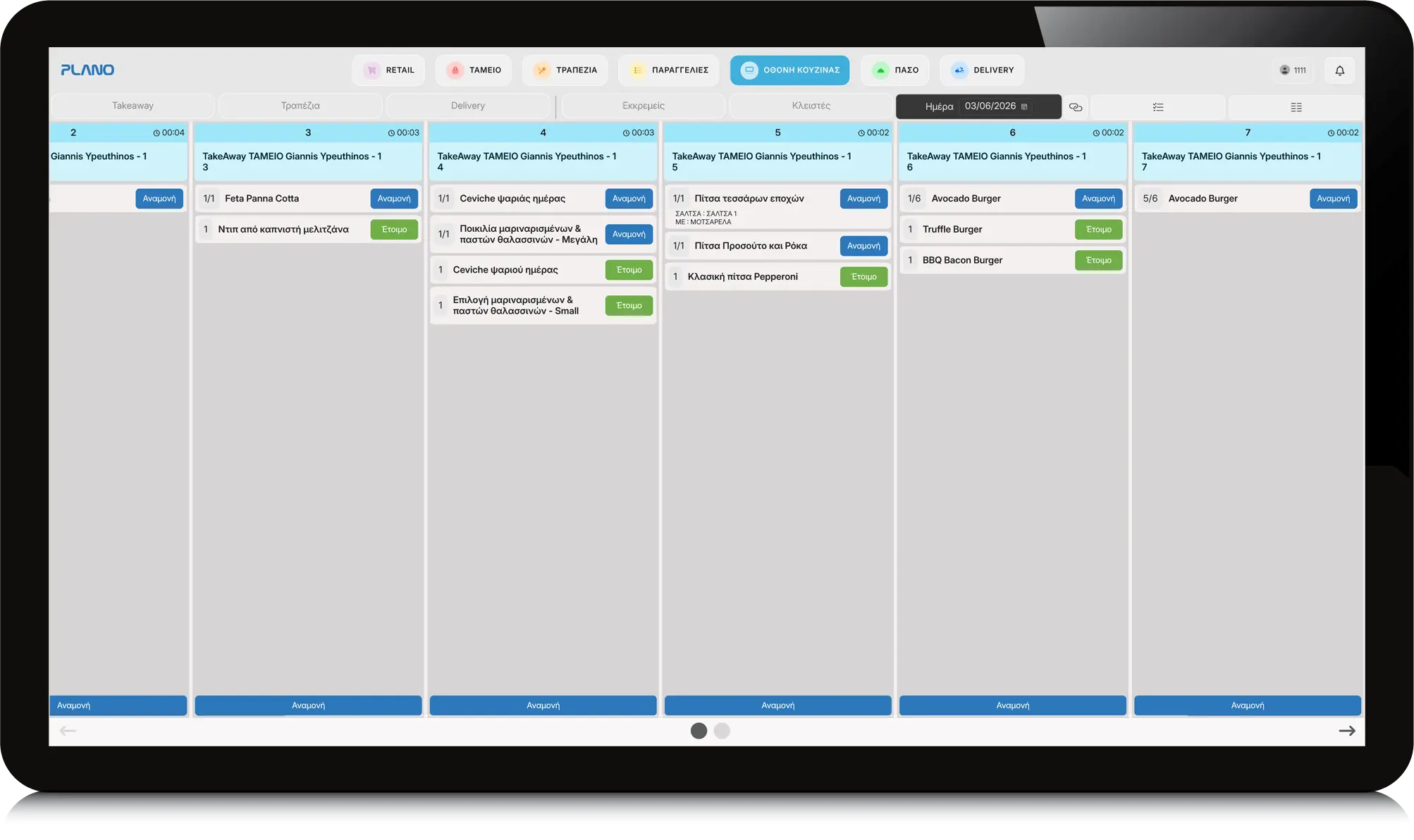
Kitchen display solution for a more organized kitchen order flow
Kitchen display solution for food service businesses that want more visible and more organized management of the order flow in the kitchen.
What is the KDS App
A solution for better kitchen organization
Plano Estiasis KDS App is the PLANO ESTIASIS ecosystem solution for kitchen display operations and better organization of the order flow in the kitchen.
The solution helps the kitchen work with a clearer view of the flow, better coordination around orders and stronger operational continuity between order taking and execution.
In a food service business with increased order volume, the goal is not only for the order to reach the right point. The goal is to have more visible management of what happens in production and better organization of daily operations.
Why it helps the kitchen flow
A more visible and more organized view of orders
The kitchen is one of the most critical points in the daily operation of a food service business. When the flow is not clear, delays, miscommunication and pressure on the team can easily occur.
Better order visibility
The kitchen gains a clearer view of the order flow and can monitor execution in a more organized way.
Clearer daily organization
Production works with greater clarity, especially when order volume increases.
Better coordination
Service points and production are connected through a more unified operational logic.
Less friction during peak hours
The team can work with a more stable rhythm and less confusion when there is pressure.
How it works with Waiter App, Register and Pass App
The KDS App as part of the complete service flow
Plano Estiasis KDS App does not work in isolation. It is part of a broader operational logic that connects order taking or order entry, point-of-sale management and the transition from order to execution.
Order taking and order entry
The flow starts from the points where the order is taken or entered.
Connection with the point of sale
The Register helps the overall operation have a clearer view at the cashier and management level.
Transition to execution
The order moves in a more organized way to the kitchen or production point.
Coordination between dining area, register, pass and kitchen
The overall operation gains better continuity from service to production.
Which types of businesses it fits
For businesses that need better kitchen organization
Plano Estiasis KDS App is suitable for food service businesses where the kitchen or preparation area needs more visible and more organized flow management.
It is ideal for restaurants with increased order flow, cafés and all-day concepts with real-time production, as well as take away stores with high activity.
The solution also fits fast casual and fast food businesses, or any store that needs better coordination between order taking and execution.
- Restaurants with increased order flow
- Cafés and all-day concepts with real-time production
- Take away stores with high activity
- Fast casual and fast food businesses
- Businesses that need better coordination between order taking and execution
What value it brings to the PLANO ESTIASIS ecosystem
A clearer connection between the kitchen and the overall operation
Plano Estiasis KDS App addresses a key operational need: how the kitchen flow is organized more effectively and how the execution point connects with the overall operation of the business.
Kitchen flow scenario
It helps the business understand and organize the kitchen flow more effectively.
Kitchen positioning
It gives the kitchen a clearer role within the overall operational ecosystem.
Related modules
It connects naturally with Waiter App, Register and Pass App for a more complete flow.
Demo or contact
It guides the interested user to the next step for evaluating the right solution.
Frequently Asked Questions
Answers about Plano Estiasis KDS App
What is Plano Estiasis KDS App?
It is the PLANO ESTIASIS ecosystem solution for kitchen display operations and better organization of the order flow in the kitchen.
How does the KDS App help?
It helps the business organize the order flow more clearly at the execution point and connect the kitchen more effectively with the overall operation.
How does it connect with Waiter App, Register and Pass App?
It works as a complementary part of these modules and helps make the flow from order taking to execution more organized.
Which businesses is it best suited for?
It is best suited for food service businesses with increased order flow, a need for better kitchen organization or a need for more visible order management at the execution point.
What is the main goal of the solution?
The main goal is to support a clearer order flow in the kitchen, better understanding of the kitchen display scenario and more effective coordination within the PLANO ESTIASIS ecosystem.
Contact QORECT
Give your kitchen a clearer flow and better organization
If you want to better organize the order flow in your kitchen and connect order taking with execution more effectively, Plano Estiasis KDS App can become a useful part of your overall setup.
Talk to the Qorect team and see how the right solution can be configured for your business.
Technical Specifications
Windows System Requirements
Minimum Specifications
CPU: Intel Core i3-8100 / AMD Ryzen 3 3200G or higher quad-core processor
RAM: 8 GB DDR4
Storage: 256 GB SSD
Windows OS: Windows 10 64-bit (Version 2004 / Build 19041 or newer) or Windows 11
Recommended Specifications
CPU: Intel Core i3-12100 / i3-13100 / i3-14100 / i5-10400 or AMD Ryzen 3 4300G or higher
RAM: 12+ GB DDR4
Storage: 256 GB SSD
Windows OS: Windows 11
Android System Requirements
Minimum Specifications
CPU: Entry-to-Mid Octa-Core
Example Chipsets: MediaTek Helio G99 / G100, Qualcomm Snapdragon 695 5G
RAM: 6 GB
Storage: 128 GB / 256 GB
Operating System: Android 8+
Example Devices:
Smartphones: Xiaomi Redmi Note 13 Pro 4G (8GB RAM), Poco M6 Pro (8GB RAM), Motorola Moto G54 5G (8GB RAM)
Tablets: Samsung Galaxy Tab A9+ 11" (8GB RAM / 128GB), Lenovo Tab Plus
Recommended Specifications
CPU: Mid-to-High Octa-Core
Example Chipsets: Qualcomm Snapdragon 7s Gen 2, MediaTek Dimensity 7050 / 7300
RAM: 8 GB to 12 GB
Storage: 256 GB / 512 GB
Operating System: Android 12+
Example Devices:
Smartphones: Motorola Edge 50 Fusion (12GB RAM), Xiaomi POCO X6 5G (12GB/256GB), Xiaomi Redmi Note 14 5G (8GB RAM)
Tablets: Xiaomi Pad 7, OnePlus Pad 2
Printer Requirements
Technology: Thermal line printing
Command Language: ESC/POS
Paper Width: 80mm
Print Resolution: 203 dpi (8 dots/mm) / 576 dots per line
Print Speed: ≥ 250 mm/s
Connectivity: Ethernet
Cash Drawer Port: Yes
Paper Cutting: Automatic cutter
Barcode: 1D (EAN-13, CODE39, CODE128) and 2D (QR Code)
Logo Printing: Bitmap / downloadable graphics support
Codepage: Greek character support (CP737 or ISO-8859-7)
Sensors / Alerts: Paper-out sensor, audible buzzer
Paper Roll: Up to Ø80–83mm, 0.06–0.08mm thickness
OS Compatibility: Windows 10 / 11 (64-bit), Android, Linux
Example Device:
iRS SP POS896 (SPRT SP-POS896) — 80mm, 260mm/s, USB/Ethernet